
AI Creation Guides, Tutorials & Product Updates
Read AI creation guides, product updates, and tutorials for creating images, videos, scripts, audio, and cleaner commercial outputs with ClipCanva.
Kling 4.0 Is Live. Omni Reference Is Not a Signed Script
Kuaishou says Kling 4.0 launched 15 October 2026. Fifteen references and a Canvas agent still do not replace a locked line, a first frame, and an 8-second crop.
YouTube Music Added AI Labels. A Prompted Track Is Not a Music Video
YouTube Music started labeling songs created primarily with generative AI on 14 Oct 2026. Map Fully, Partly, and No Gen AI to lyrics, music, and clip desks before you upload.
Clueso Raised $10M for Agentic Video. A Browser Agent Is Not a Signed Script
Clueso’s $10M Series A funds an agent that can record your product. That is not a signed explainer. Lock the script, then capture or generate.
ElevenCreative Brand Kit. Tagging Colors Is Not a Signed Clip
ElevenLabs Brand Kit (9 Oct 2026) stores colors, fonts, logos, and rules you tag with @. It does not write the claim, lock the still, or ship the clip.
Claude Motion Does Not Generate Footage. The Explainer Still Needs a Script
Claude Motion is code animation, not a video model. Lock the explainer script first, then export to Runway for footage. Operator guide with sources.
Veo 3.1 Preview Can Shut Down on 22 October. Swapping the String Is Not the Brief
Google’s deprecations table lists 22 October 2026 as the earliest shutdown for Veo 3.1 preview IDs and Omni Flash preview. The recommended replacement is gemini-omni-1.1-flash. Lock the spoken line before you migrate the string.
Nano Banana 2.1. A Panoramic Still Is Not a Clip
Gemini Nano Banana 2.1 is GA for stills, not video. Lock the frame, then image-to-video — panoramic 8:1 is not the clip.
SynthID Detector. A Watermark Hit Is Not a YouTube Label
Google opened SynthID Detector to everyone on 7 Oct 2026. A watermark hit is a file check, not a YouTube AI-use disclosure or a signed clip. Write the line, then generate.
Asset Studio Gemini Omni. A Photo-to-Video YouTube Ad Is Not a Signed Brief
Google’s Oct 1 Ads post says Asset Studio, powered by Gemini Omni, turns URLs and photos into YouTube videos. Lock the signed line, stills, and format before you generate.
Gemini Omni Replaces Veo in the Gemini App. A 10-Second Chat Clip Is Not a Script
Google's Gemini app now points video to Omni 1.1 Flash, not Veo. Lock the line first — a 10-second chat clip is not a script.
Kling 4.0 Keyframes. Thirty Seconds Still Need a Shot List
Kling 4.0 sells native 30-second clips and 10 keyframes. That is a timeline desk, not a signed commercial. Lock the shot list before you generate.
Ideogram 4.5 in Runway MCP. A Still Is Not a Clip
Ideogram 4.5 in Runway MCP is an image desk, not a clip. Lock the still, then image-to-video. Runway’s 2 Oct changelog does not turn a PNG into Friday’s restock.
Gemini Skills Replace Gems. They Do Not Create Video Yet
Google is replacing Gems with reusable Gemini skills. Help says skills do not yet run Create video. Lock the line, then generate the clip.
Gemini 4 Argon Understands the Recording. It Does Not Ship the Clip
Gemini 4 Argon is a long-horizon reasoning model with a published long-video understanding score. It is not a generate desk. Summarize, lock the claim, then cut.
Eleven v4 vs Script Generator: A Voice Line Is Not a Shippable Clip
Eleven v4 is TTS, not a video generator. Lock the script, then voice, then the clip — with VEED, Kapwing, and Runway Creative catalog notes.
Runway OpenAI Marketplace vs Generate Desk: Spend Is Not a Clip
Runway listed Runway Creative on OpenAI Marketplace on 29 Sept 2026. That is a budget path, not a clip desk. Lock the script, then generate.
ChatGPT Plugins vs Video Script Generator: After Sora, Chat Is Not a Clip Desk
After OpenAI shut down the Sora API on September 24, 2026 with no listed replacement, ChatGPT plugins can host a vendor generator — they do not sign a script. Lock the line, then generate.
Runway MCP on Cursor vs Generate Desk: A Marketplace Plugin Is Not a Signed Clip
Runway MCP on Cursor is a generate host, not a writer. Separate Dev MCP from mcp.runwayml.com, lock the script, then generate the clip.
Runway AI Summit vs Generate Desk: A Wednesday Keynote Is Not Monday's Clip
Runway's 30 Sep 2026 SF summit is a keynote, not a shippable clip. What already shipped on MCP, and how to lock a script before you generate.
Runway DaVinci Resolve Plugin vs Generate: Restyle Is a Timeline Desk, Not a New Clip
Runway’s 23 Sep 2026 DaVinci Resolve plugin restyles the clip under your playhead with Aleph 2.0. It is a timeline desk, not a script or a new generate button.
Gemini Omni 1.1 in Google Vids: Free 1080p Is a Clip Desk, Not a Script
Google put Gemini Omni 1.1 Flash in Google Vids on 23 Sep 2026: free 1080p clips, scene duration, SynthID. TTS is coming soon — lock the script before you generate.
Suno v6 vs Canva AI Lyrics Generator: A Song File Is Not a Music Video
Suno v6 is three song desks (v6, wild, mini), not a music video. Lock the lyric, then generate an 8-second clip.
Gemini 3.8 Live vs Video Script Generator: A Voice Brief Is Not a Shippable Clip
Google’s Gemini 3.8 Live models output spoken audio and text, not finished video. Use the live session as a brief, lock a script, then generate clips.
Runway Real-Time Moderation vs Generate: A Live Stream Is Not a Shippable Clip
Runway’s 16 Sep 2026 real-time moderation post is a safety desk, not a generate button. Stream halt is not a take. Script first, then generate a finished clip.
Runway Unified Pricing vs Generate: One Credit Pool Is a Billing Desk, Not a New Clip
Runway unified pricing (18 Sep 2026) lets purchased credits spend on the web app and Runway Dev. Treat the pool as a billing desk: sign the script, lock the still, then generate.
Runway Enhance Frame Rate vs Generate: Interpolation Is a Conform Desk, Not a New Clip
Runway’s Enhance Frame Rate (17 Sep 2026) retimes existing clips to 25–120 fps, including 59.94. Interpolate after you lock the shot — it is not a generate button.
Pika Shot List vs Auto Model Router: An Editable Shot List Is Not a Generate Button
Semafor says Pika now turns basic details into an editable shot-by-shot list and auto-picks a model per element. Sign the script first, then generate one card at a time.
Canva ProSuite vs Visual Suite vs 8-Second Clip Desk: Affinity and Cavalry Are Not a Generate Button
Canva ProSuite (16 Sep 2026) groups Affinity, Cavalry, Flourish, and Leonardo. That is a craft stack, not Canva AI's 8-second video clip. Pick the desk before you generate.
Gemini Notebook Short Video Overviews: 60-Second Explainers Are Not an 8-Second Clip Desk
Google’s Gemini Notebook Short Video Overviews are ~60-second source-grounded explainers. Split them into 6–8 second clip cards before you generate — workflow, comparison table, and FAQ.
Sora API Shuts Down September 24: Export First — OpenAI Lists No Replacement
OpenAI ends the Sora API on September 24, 2026 with no listed replacement. Export keepers, then rebuild clip-length beats on a live desk.
Kling TIFF Panel: The Script Is Still the Blueprint — Write Shots Before You Prompt
Kling’s TIFF panel: the script is still the blueprint. Write shot lists before AI video prompts, lock a still, then generate batch clips.
Runway Instant Video vs Batch Clips: Pick the Desk Before You Wait for Real Time
Runway’s 10 Sep 2026 instant-video research is first-frame streaming, not an ad exporter. Lock the still and caption, then ship a batch clip.
DaVinci Resolve 21.1 AI Assistant vs Runway Adobe Plugin: Pick the Desk Before You Cut Highlights
Resolve 21.1’s AI assistant cuts highlights from footage you already have. Runway’s Adobe plugin generates or restyles clips. Lock the story first, then pick the desk.
GPT Image 2.5 Flare vs Sunburst: Pick the Still Desk, Then Image-to-Video
OpenAI launched ChatGPT Images 2.5 on September 8, 2026. Use Flare for fast drafts, Sunburst for precise edits, then send approved stills to image-to-video.
Runway Adobe Plugin vs Premiere Generative Media: Pick the Desk Before You Fill the Gap
Compare Runway's Premiere and After Effects plugin with Adobe Premiere Generative Media. Restyle existing takes with Aleph 2, fill timeline gaps, and keep the script portable.
AI Lip Sync vs Native Audio vs Beat Sync: Pick the Desk Before You Generate
Lip sync, native audio, and beat sync are three desks. Lock the script, then choose face-sync, one-pass audio, or music timing without mixing the jobs.
Video Script Generator vs Script-to-Video vs 8-Second AI Clip: Pick the Desk Before You Generate
A video script generator writes words. Script-to-video is a talking-head read. An 8-second AI clip is a scene. Map the three desks before you spend credits.
Lyria 3.5 Workflow: 30-Second Gemini Clips, Then Full Songs, Custom Lyrics, and Video Hooks
Lyria 3.5 is in Gemini and the Gemini API. Draft 30-second clips first, then generate full songs with custom lyrics, and turn the approved hook into video.
MiniMax H3 Max Workflow: Fast 480p Drafts, First and Last Frames, Then 2K Keepers
Use MiniMax H3 Max for 5–15s 480p/768p text and first-last-frame drafts, then promote keepers to MiniMax H3 2K. Specs, credits, and a creator checklist.
Kling MCP and CLI Workflow: Batch AI Videos From One Approved Setup
Kling MCP and CLI let AI agents batch video jobs. Approve stills and prompts first, then generate, poll, and review—without installing both connectors.
Gemini Agentic Video Understanding Workflow: Static vs Agentic Mode, Then Summaries and Scripts
Google’s 1 Sep 2026 agentic video mode skips 1 FPS sampling. Use it for long-form moment retrieval, then turn timestamps into summaries and scripts.
DALL-E GPT Is Retired: Move Stills to ChatGPT Images, GPT Image 2, Then Image-to-Video
OpenAI retired the official DALL-E GPT in ChatGPT on 30 August 2026. What shut down, what still works, and a stills-to-video workflow with ChatGPT Images, GPT Image 2, and image-to-video.
ElevenMusic Composer Workflow: Section-by-Section Song Edits, Then Lyrics-to-Video Clips
ElevenMusic Composer lets you rewrite a verse or chorus without regenerating the whole song. Lock lyrics, click Generate, then turn the hook into video clips.
Gemini 3.5 Transcribe Workflow: Verbatim vs Smart Transcripts, Then Scripts and Shorts
Google’s Gemini 3.5 Transcribe (26 Aug 2026) splits live captions from file transcripts. Use verbatim vs smart modes, then rewrite scripts on ClipCanva.
Gemini Omni 1.1 Flash Workflow: First and Last Frames, 40-Second Scene Extension, and 4K Upscale
Gemini Omni 1.1 Flash adds first/last-frame interpolation, 10-second scene extension up to 40 seconds, 360p drafts, and 4K upscale. Operator workflow, limits, and ClipCanva handoff.
Muse Image Workflow: $0.01 API Stills, Multi-Reference Edits, Then Image-to-Video
How to use Meta Muse Image at $0.01 per API still: lock references, edit once, skip withdrawn Instagram tags, then hand the keeper to image-to-video.
Gemini Omni Flash Workflow: Conversational Edits, 10-Second Clips, and First-Frame Tags
A creator workflow for Gemini Omni Flash: conversational edits, 3–10 second 720p clips, first-frame vs reference tags, and what the Gemini API will not do.
Grok Imagine Video 1.5 Workflow: Start Frames, References, Native Audio, and 1080p Limits
A creator workflow for Grok Imagine Video 1.5: pick start-frame or reference mode, stay inside official 15-second and 1080p limits, and know what to generate on ClipCanva instead.
Runway Ruby HDR Workflow: Convert SDR AI Video to HDR10, HLG, ProRes, and EXR
Runway Ruby converts approved SDR AI video to true HDR. Use this workflow to choose Gen-4.5 native HDR versus a Ruby upconvert, pick HDR10, HLG, ProRes, or EXR, and keep product identity locked.
MiniMax H3 Workflow: First and Last Frames, Native Audio, and 2K Clips
Use MiniMax H3 for 5–15 second 2K clips with native stereo audio. Pick text-to-video or first/last-frame mode, write a beat sheet, and generate on ClipCanva.
Seedance 2.5 Workflow: 30-Second One-Take Clips, Multimodal References, and Timestamp Edits
Official Seedance 2.5 workflow: 30-second one-take clips, 30 image / 10 video / 10 audio references, timestamp edits, and a packet you can run before a live 2.5 generator is connected.
FLUX 3 Video Continuation Workflow: 20-Second Clips, Keyframes, and the 15-Second V2V Limit
FLUX 3 video continuation is capped at 15 seconds as of 17 Aug 2026. Use t2v, i2v keyframes, v2v, and draft-enhance without mixing modes.
Kling Image 3.0 Omni Workflow: Native 4K Stills, Image Series, Then Image-to-Video
Lock a native 4K still series in Kling Image 3.0 Omni, then animate one approved frame. A creator workflow for identity, boards, and image-to-video.
Wan 3.0 Document-to-Video Workflow: Turn Briefs, PDFs, and Webpages Into 30-Second AI Clips
A creator workflow for Wan 3.0 document-to-video: how official 30-second clips, reference assets, and webpage/PDF inputs change script, prompt, and review steps.
How to Write Cinematic AI Video Prompts: Shot Types, Lighting, and Scene Cards
A practical 2026 guide to cinematic AI video prompts: shot types, lighting, one camera move, and scene cards for Veo, Kling, Runway, Canva, and Luma workflows.
Kling 3.0 Omni vs Veo 3.1 vs Runway Gen-4.5: AI Video Workflow for Audio, Continuity, and Control
Compare Kling 3.0 Omni, Veo 3.1, Runway Gen-4.5, and Ray 3.2 with a practical AI video workflow for audio, continuity, prompts, and review.
AI Storyboard Generator Workflow: Turn Scripts Into Shot Lists, Prompts, and Video Clips
A practical AI storyboard generator workflow for turning scripts into scene cards, shot lists, prompts, image-to-video clips, and review-ready AI videos.
AI Avatar Video Generator Workflow: Script, Voice, Dubbing, and Repurposed Clips
A practical AI avatar video generator workflow for scripts, voices, dubbing, captions, localization, and repurposed creator clips.
AI Movie Generator From Script: A Creator Workflow for Scenes, Voiceover, and Final Clips
Learn how to turn a script into AI-generated movie scenes with scene tables, prompts, voiceover planning, model workflow choices, and review checks.
AI Video Model Router Workflow: How to Choose the Right Model for Each Clip
Learn how to choose the right AI video model or workflow for scripts, product shots, references, long-video clips, audio, and final edits.
Multi-Reference AI Video Workflow: Keep Products, Characters, and Style Consistent
A practical multi-reference AI video workflow for preserving product, character, style, and motion consistency across creator clips.
Product Demo Video Script Generator Workflow: Brief, Scenes, Voiceover, and AI Video Prompts
A practical product demo video script generator workflow for turning briefs, images, and source videos into scene tables, voiceover, AI video prompts, and CTAs.
AI Training Video Script Generator Workflow: Turn SOPs, Tutorials, and Webinars Into Short Lessons
Use an AI training video script generator to turn SOPs, tutorials, webinars, and demos into teachable scripts, scene tables, voiceover, and review checklists.
AI Video CTA Script Generator Workflow: Hooks, Offers, End Cards, and Prompt-Ready Scenes
A practical workflow for writing AI video CTA scripts: hook, offer, proof, end card, and prompt-ready scenes for creators making ads, Shorts, and demos.
Explainer Video Script Generator Workflow: From Brief to Finished AI Video
A practical workflow for turning a product brief into an explainer video script, storyboard, voiceover notes, and AI video prompts.
Text-to-Video Generator With Continuity: Prompt Workflow for Characters, Products, and Multi-Shot Scenes
Learn a continuity-first text-to-video workflow for characters, products, multi-shot scenes, prompts, references, and AI video review.
GPT Image 2 Prompt Examples: Photorealistic Portraits, Product Shots, and Social Ads
Use GPT Image 2 prompt examples for photorealistic portraits, product shots, and social ads, with workflow tables, QA checks, and model-safe editing tips.
Veo 3.1 vs Canva AI Video Generator: Creator Workflow for Scripts, Audio, and Image-to-Video
Compare Veo 3.1 and Canva AI Video Generator for scripts, audio, image-to-video, editing, and creator publishing workflows.
AI Video Analysis to Script Workflow: Turn Retention Signals Into Shorts, Prompts, and Summaries
A practical AI video analysis workflow for turning retention signals, chapters, and summaries into better scripts, shorts, prompts, and video reviews.
AI Prompt Library vs Prompt Generator: The Creator Workflow for Video, Image, and Music
Learn when to use a prompt library, when to use a prompt generator, and how creators can turn reusable prompt ideas into better video, image, script, and music workflows.
Best Sora Alternatives in 2026: Veo, Runway, Luma, Canva, and a Safer Creator Workflow
Compare practical Sora alternatives after OpenAI’s 2026 shutdown: Veo, Runway, Luma Ray, Canva, VEED, and a script-to-video workflow for creators.
Suno vs Udio vs Canva AI Music Generator: Lyrics-to-Video Workflow for Creators
Compare Suno, Udio, and Canva AI Music Generator, then turn lyrics and tracks into visualizers, shorts, and AI video workflows with ClipCanva.
PixVerse V6 AI Video Workflow: Prompt, Image-to-Video, and Model Choice Checklist
A practical PixVerse V6 AI video workflow guide for creators, with prompt structure, image-to-video tips, model comparisons, source links, and production checks.
Canva AI Video Prompt Examples for Dialogue, Sound Effects, and Short Clips
Practical Canva AI video prompt examples for dialogue, sound effects, product reveals, Shorts hooks, explainers, and creator review workflows.
Veo 3.1 Image-to-Video Workflow: First Frame, Last Frame, and Creator Checklist
Use Veo 3.1 image-to-video with first and last frames, source-image rules, prompt structure, comparison checks, and a creator review checklist.
Google Vids Personal Avatars: Script, Record, Generate, and Repurpose Workflow
A practical creator workflow for Google Vids personal avatars: script the message, generate the presenter segment, review risks, and repurpose clips with ClipCanva.
JFIF to JPG Workflow for AI Image and Video Creators
Convert JFIF to JPG for AI image and video workflows: compatibility, metadata cleanup, first-frame prep, format choices, and creator review checklist.
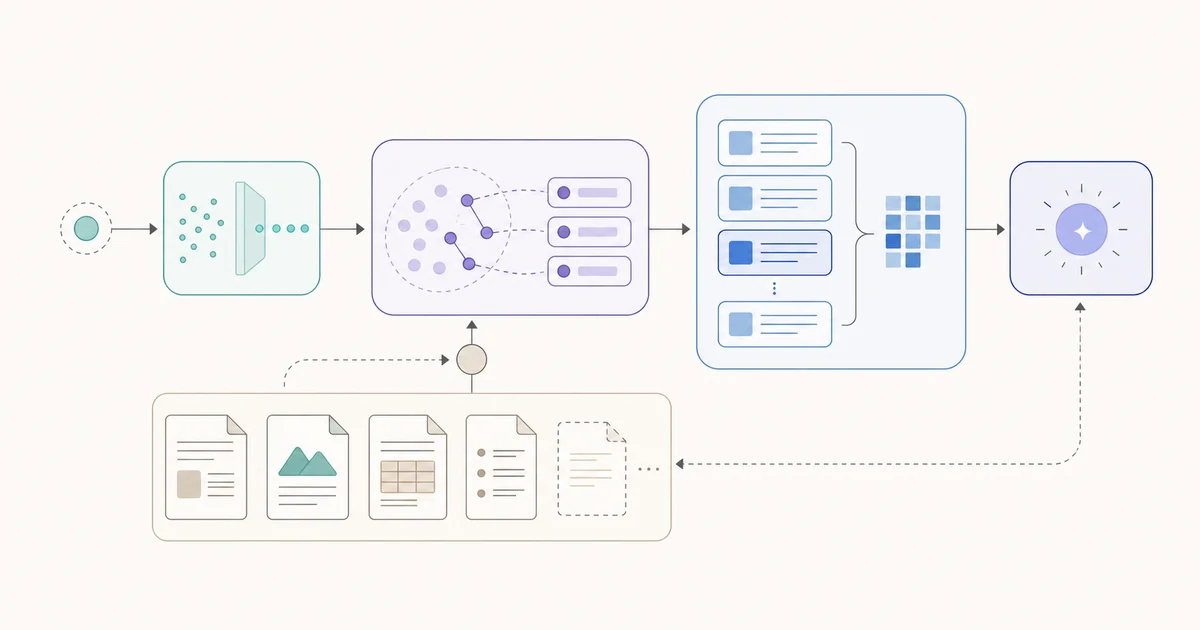
How to Create a RAG System Diagram
Map a verified retrieval-augmented generation workflow into a clear system diagram.
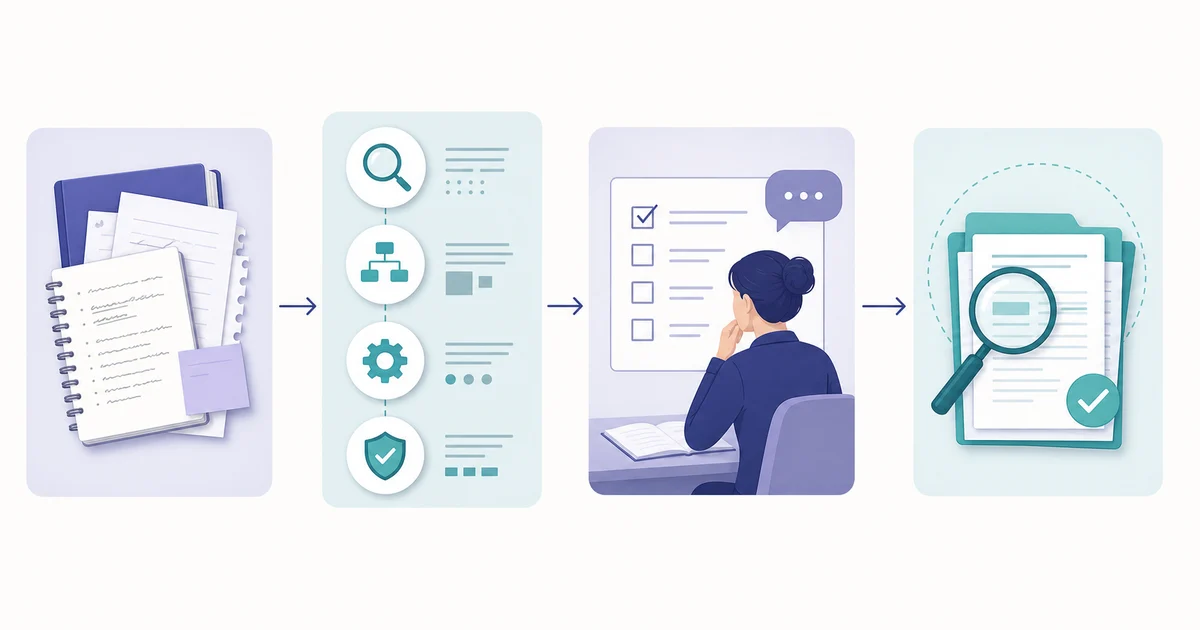
How to Create a Research Methodology Diagram from a Paper
Turn a verified methods section into a clear methodology diagram: extract the real steps, define the relationships, write a focused visual brief, and review every detail.
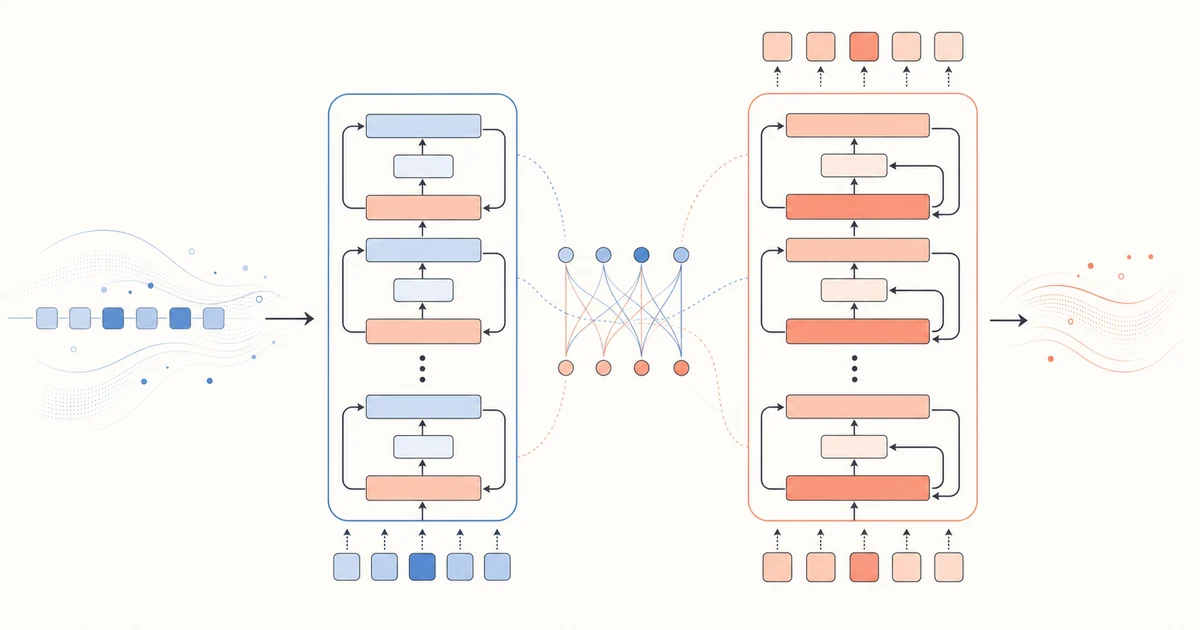
How to Create a Transformer Architecture Diagram
Map the verified Transformer layers, attention paths, and outputs into a readable visual draft.
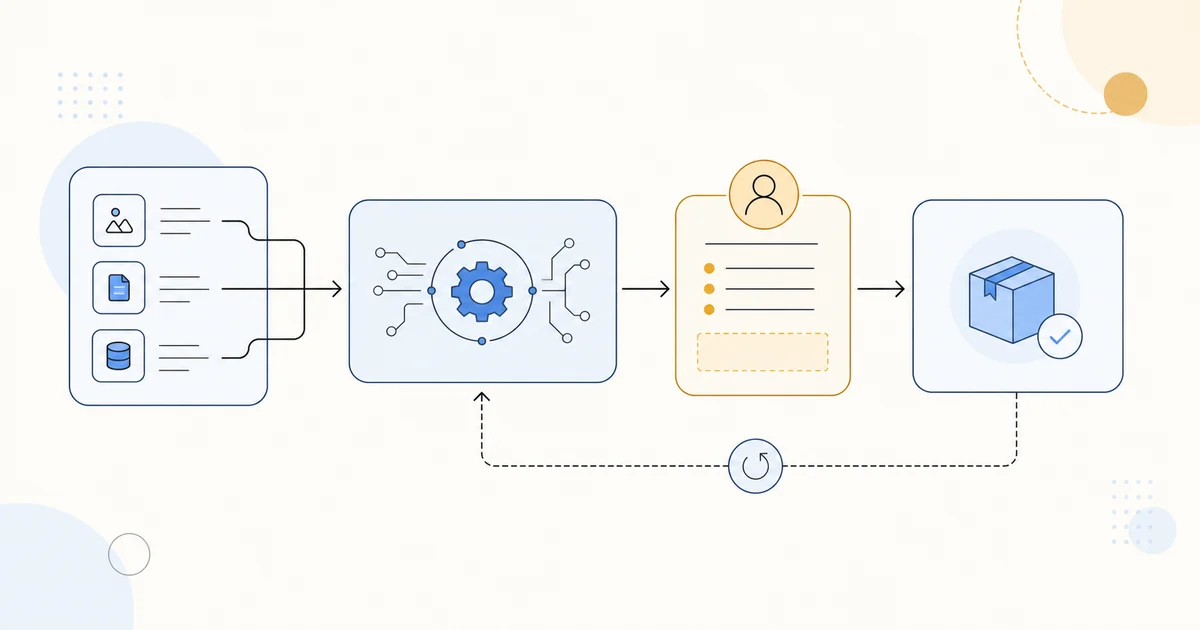
How to Design an AI Workflow Diagram
Design an AI workflow diagram that makes inputs, model steps, human review, handoffs, and feedback visible without inventing process details.
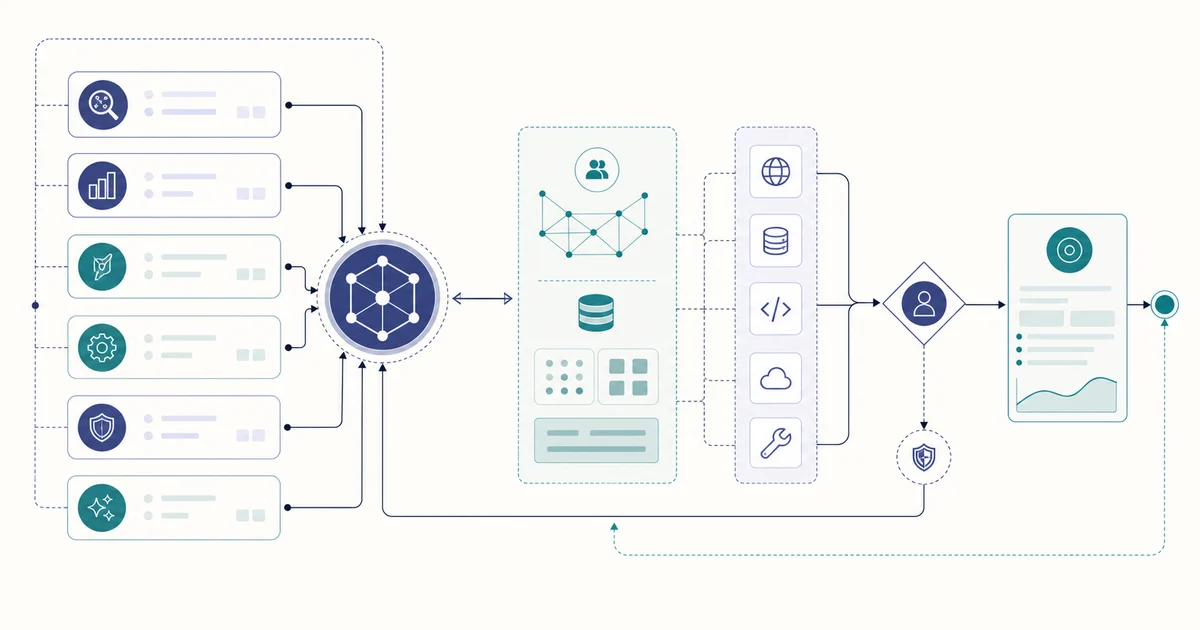
How to Map a Multi-Agent System Diagram
Map a multi-agent system diagram with clear roles, handoffs, shared context, tool boundaries, and review paths—without overstating capabilities.
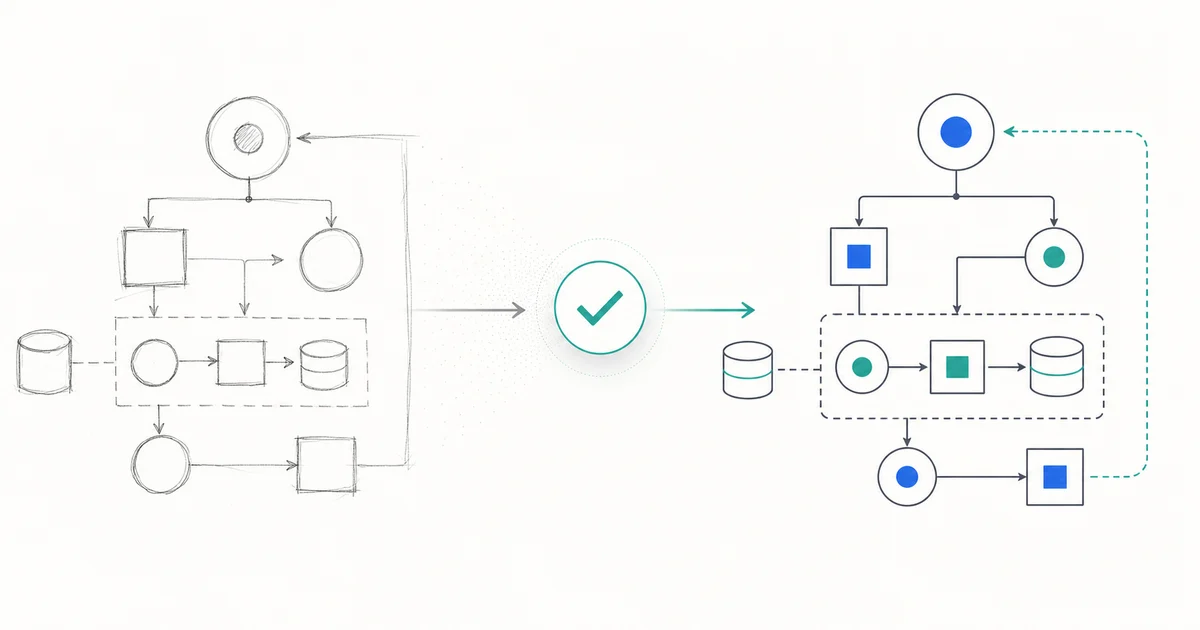
How to Turn a Sketch into a Clean Technical Diagram
Turn a verified sketch into a clear technical diagram by preserving the real structure, writing a focused brief, and reviewing the result against the source.
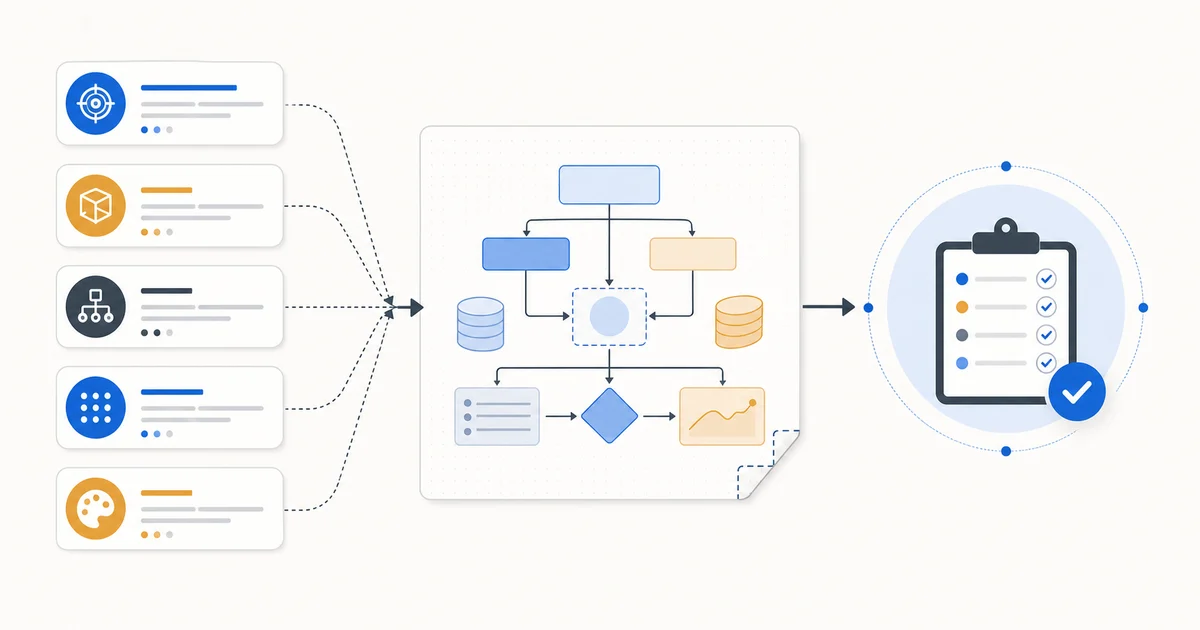
How to Write a Clear AI Research Diagram Prompt
Write an AI research diagram prompt that names the real components, relationships, layout, and review constraints—without asking the generator to invent research details.
Narrative Traction Analysis for Video Content: Find Hooks, Drop-Offs, and Clip Ideas
Learn a practical narrative traction analysis workflow for video content: map hooks, drop-offs, retention signals, clip ideas, and AI-assisted script rewrites.
Canva AI Video Generator With Synchronized Audio: Creator Workflow and Limits
A practical creator workflow for Canva AI Video Generator, synchronized audio, dialogue, sound effects, Veo, and final editing checks.
AI Action Figure Video Generator Workflow: From Character Image to Collectible-Style Clip
A practical guide to making AI action figure videos from prompts or images: packaging reveals, rotations, prompt structure, model choices, review checklist, and FAQ.
Luma Ray vs Google Veo: Which AI Video Workflow Should Creators Use?
Compare Luma Ray and Google Veo by creator workflow, camera control, image-to-video use cases, review checklist, and when to choose each AI video model.
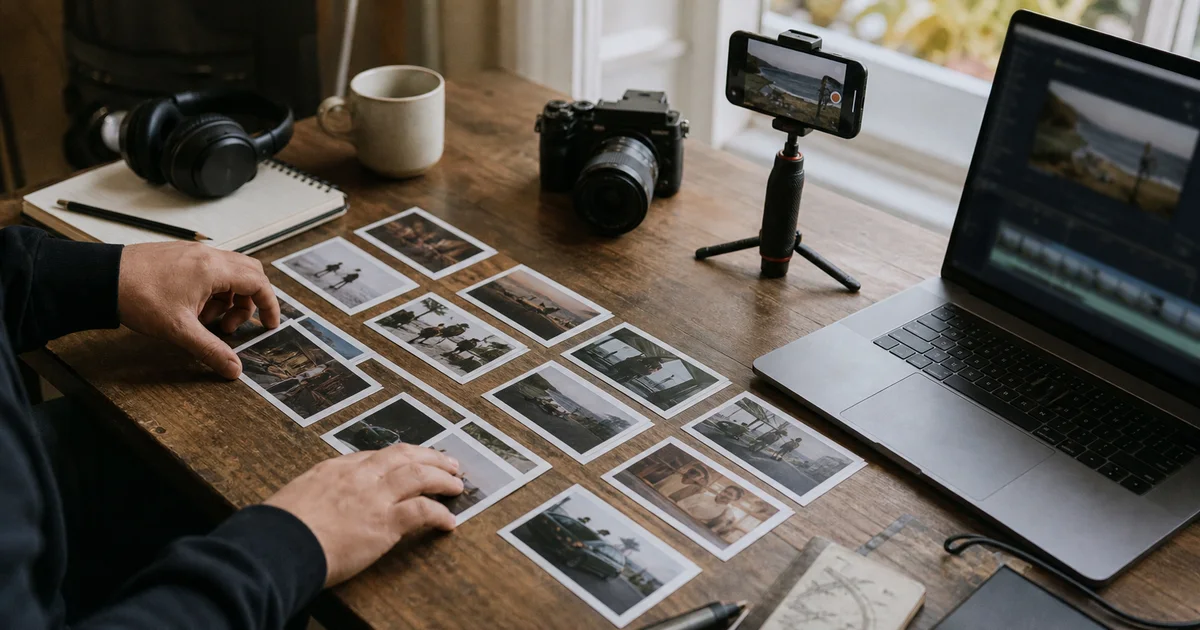
Veo 3.1, Runway Gen-4.5, and Pika: AI Video Workflow Comparison for Creators
Compare Veo 3.1, Runway Gen-4.5, Pika, Canva, and VEED for AI video workflows, with a creator checklist for scripts, prompts, image-to-video, and final edits.
Image-to-Video First Frame Prompts: A Creator Workflow for Product Ads, Shorts, and Explainers
Learn how to write image-to-video first frame prompts for product ads, Shorts, explainers, and creator workflows with examples, checklists, and source-backed guidance.
GPT Image 2 Prompt Examples for Photorealistic Portraits, Product Shots, and Readable Text
Practical GPT Image 2 prompt examples for portraits, product shots, readable text, character consistency, UI mockups, and image-to-video first frames.
15 Best Birthday AI Photo Prompts for Stunning Celebration Pictures
Copy birthday AI photo prompts for elegant portraits, party scenes, milestone birthdays, kids celebrations, couples, groups, and social posts.
18 Mountain Color Palette Ideas with Hex Codes and AI Prompts
Explore mountain color palette ideas with hex codes and ready-to-use AI prompts for posters, brand moodboards, travel graphics, and product scenes.
Work Outfit Ideas: 12 Practical Looks for Different Office Dress Codes
Explore practical work outfit ideas for business formal, business casual, smart casual, creative offices, and hybrid work, with AI try-on prompts.
Luma Ray 3.2 Keyframe Workflow: Control Motion, Continuity, and Final Edits
A practical Luma Ray 3.2 keyframe workflow for AI video creators: plan scripts, first frames, motion beats, continuity checks, and final edits.
AI Music Video Generator Workflow: Lyrics, Audio, Visuals, and Shorts
A practical AI music video generator workflow for turning lyrics, audio, cover art, and short hooks into publishable creator videos.
Reference-to-Video AI Workflow: Control Products, Characters, Style, and Motion
A practical reference-to-video AI workflow for creators: choose references, protect product identity, plan motion, review outputs, and connect scripts to video generation.
AI Video Dialogue and Sound Effects Workflow: Script, Prompt, Generate, Review
Plan AI video dialogue, voiceover, ambient sound, and sound effects with a script-first workflow for creator clips, ads, explainers, and product videos.
Podcast Script Generator Workflow: Plan an Episode, Voiceover, and Short Clips
A practical podcast script generator workflow for planning episodes, intros, sponsor-safe wording, repurposed clips, and AI video prompts from one show brief.