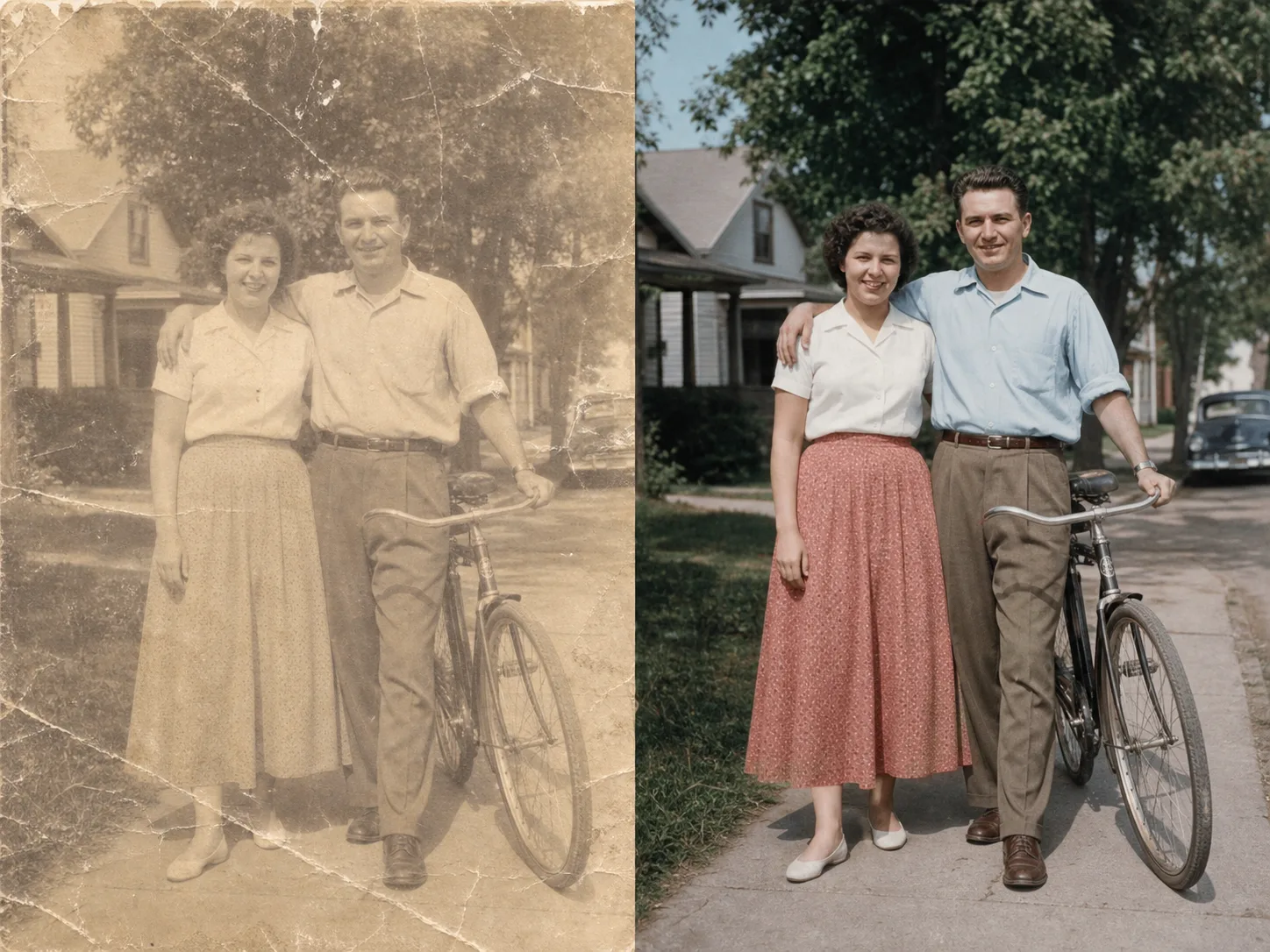
AI Image Cleanup

Upload an image for a guided cleanup review. Advanced controls appear only after the file and scope are clear.

Pro WorkflowImage CleanupReview StatePermission Check

Pro mode

Upload for review

Advanced controls appear after upload

Advanced after upload

The first view stays simple. Detailed controls appear only after the file type and rights confirmation are clear.

Small object distractions
Background marks or overlays
Prompt-guided cleanup
Review state for ambiguous marks

Image Cleanup Examples

Use bounded examples to judge which images fit a cleanup review.

How guided image cleanup works

The page keeps the first step simple and reveals advanced controls only when they are needed.

01

Upload one image for review

Start with a file you own or have permission to edit. The tool checks support before showing detailed controls.

02

Confirm the cleanup scope

Use the guided flow for small distractions, marks, background artifacts, or visible issues that should be reviewed first.

03

Use Pro controls when needed

Advanced cleanup controls stay hidden until the file and editing permission are clear.

04

Review before export

Ambiguous edits should be checked before downloading or using the cleaned image in production assets.

Designed for bounded cleanup

Guided Cleanup

Keep the first view simple while reserving advanced cleanup controls for Pro workflows.

Permission First

The flow asks users to confirm they can edit the file before starting cleanup.

Review State

Unsupported or ambiguous cleanup requests can move into review instead of pretending every file is safe to process.

Pro-only Controls

Complex controls stay behind Pro so the default tool surface remains lightweight.

Tutustu liittyviin työkaluihin

Use simpler tools first when background removal or enhancement is enough.

Valitse suunnitelmasi

Ilmaisissa kuvissa on vesileima. Päivitä puhtaisiin tuloksiin, nopeampaan luontiin ja kaupalliseen käyttöön.

Aloituspaketti

$9

Kertaluonteinen krediittipaketti kuvien, musiikin ja lyhyiden videoiden generoinnin kokeiluun.

  • 600 krediittiä
  • Jopa 100 kuvaa
  • Jopa 7 lyhytvideota
  • Krediitit voimassa 30 päivää
  • Ei vesileimoja

Luoja

$19/mo

Kuukausipaketti · 1 500 krediittiä uusiutuu joka kuukausi

  • 1 500 krediittiä kuukaudessa
  • Jopa 250 kuvaa/kk
  • Jopa 18 lyhytvideota/kk
  • Toimii ClipCanva Pron ja muiden krediittimallien kanssa
  • Prioriteettijono
  • yhteisön tukea
  • Ei mainoksia
  • Ei vesileimoja

Pro

$39/mo

For clean, faster outputs

  • 4 000 krediittiä kuukaudessa
  • Jopa 660 kuvaa/kk
  • Jopa 50 lyhytvideota/kk
  • Toimii ClipCanva Pron ja muiden krediittimallien kanssa
  • Korkeimman prioriteetin jono
  • Avaa ClipCanva Pro
  • Ei mainoksia
  • Ei vesileimoja
  • Edistynyt tarkennus

Studio

$99/mo

Kuukausipaketti · 12 000 krediittiä uusiutuu joka kuukausi

  • 12 000 krediittiä kuukaudessa
  • Jopa 2 000 kuvaa/kk
  • Jopa 150 lyhytvideota/kk
  • Toimii ClipCanva Pron ja muiden krediittimallien kanssa
  • Korkeimman prioriteetin jono
  • Täysi yksityisyys
  • Ennakkopääsy uusiin ominaisuuksiin
  • Ensisijainen tuki

Kuukausipaketit uusivat krediitit jokaisella laskutuskaudella. Vuosipaketit antavat 12 kuukauden krediitit etukäteen ja säästävät 17 %. Käyttöarviot perustuvat edullisimpiin tuettuihin kuva- ja videomalleihin; premium-mallit, suuremmat resoluutiot, pidemmät videot, viitepohjainen generointi ja edistyneet työkalut kuluttavat enemmän krediittejä.

Joukkue

Toimistoille, tuotantotiimeille ja räätälöityihin volyymitarpeisiin.

Ota yhteyttä

Image Cleanup FAQ

Common questions before using Pro cleanup.

What is Image Cleanup for?
It is for guided cleanup of images you own, such as small distractions, background marks, or visible artifacts.
Why is this a Pro workflow?
Cleanup can require more judgment than simple background removal, so advanced controls and review states stay in Pro.
Can it remove every mark from an image?
No. Some edits are unsupported or ambiguous. The page is designed to make those limits clear before processing.

Review an image for cleanup

Use ClipCanva Pro when a simple cutout or enhancement is not enough.